Angular Modules
Explore Angular modules to understand how they organize applications by grouping components, directives, and pipes. Learn the differences from JavaScript modules, the purpose of key NgModule arrays, and how feature and shared modules improve application structure. Gain the skills to create and import modules using the Angular CLI.
With the development setup ready, we are now ready to learn about all the basic building blocks that make up an Angular application, these include components, modules, services, and pipes, etc.
The first important step in this process is to understand what Angular Modules are.
Frequently asked questions
These are some frequently asked questions by most beginners.
Q. Are Angular modules a kind of container?
Q. Are Angular modules the same as JavaScript modules?
Q. Is an Angular module a block of code with some business logic?
This lesson will cover these questions.
Angular modules
Angular modules are a key part of any Angular application.
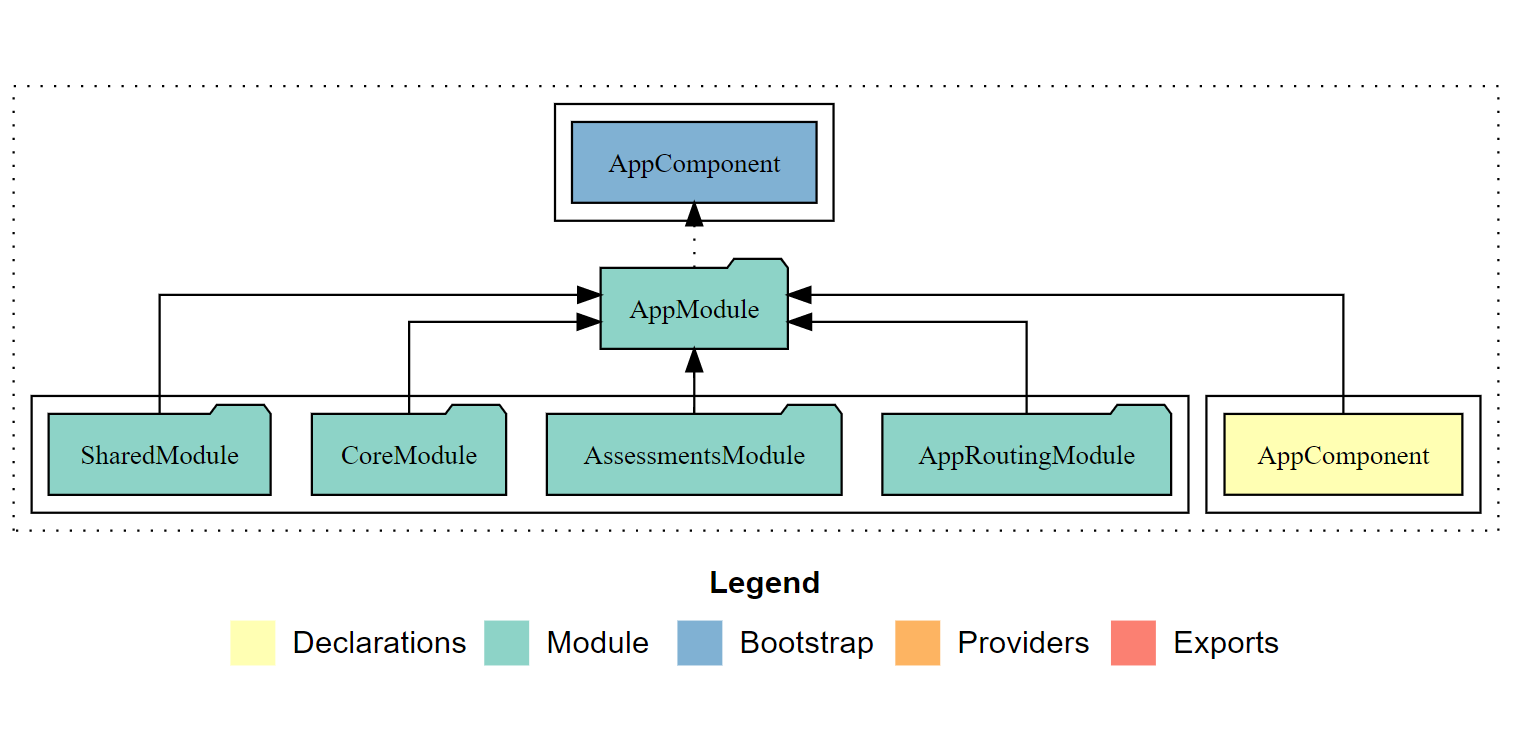
If you look at the image above, you will understand how your application structure would look like when you leverage modules in Angular.
It makes the application more logical and structured with all your functionality defined module wise.
You can think of a module as a class that is decorated with @NgModule. This helps us organize the various pieces inside our application and interact with third-party libraries by integrating them.
It also allows us to import and export the sub pieces to other modules.
The @NgModule decorator holds the metadata for the class to understand the behavior of an Angular module. NgModules comprises many elements that will be discussed later in this section.
JavaScript modules vs. Angular modules
To understand Angular modules better, we should understand the difference between Angular and JavaScript modules.
We struggle with namespaces in JavaScript, we avoid this problem in Angular by using modules that help modularize the code. With ES2015 modules, we can import and export modules, and with Angular Modules, we create containers that are comprised of components. One component can be a part of only one module.
While JS modules help us organize our code, Angular modules help structure the whole Angular application. Every Angular application has at least one module, i.e., the root module.
What does a module look like?
import { BrowserModule } from '@angular/platform-browser';
import { NgModule } from '@angular/core';
import {FormsModule} from '@angular/forms';
import { AppRoutingModule } from './app-routing.module';
import { AppComponent } from './app.component';
import { AssessmentsModule } from './assessments/assessments.module';
import { CoreModule } from './core/core.module';
import { SharedModule } from './shared/shared.module';
import { BrowserAnimationsModule } from '@angular/platform-browser/animations';

@NgModule({
  declarations: [
    AppComponent,
  ],
  imports: [
    BrowserModule,
    AppRoutingModule, AssessmentsModule, CoreModule, SharedModule, FormsModule, BrowserAnimationsModule
  ],
  providers: [],
  bootstrap: [AppComponent]
})
export class AppModule { }
An Angular module is a class decorated with the @NgModule decorator, and this contains different array values like a declaration array, imports array, etc.
How does a module work?
Let’s discuss each of these arrays, one by one.
bootstraparray This array contains the component which should be initialized and rendered with the startup of the Angular application. We need to bootstrap at least one component in the bootstrap array, but we can define this bootstrap array only in the root Application module.
bootstrap: [...]
declarationsarray
This array contains a list of components, pipes, and directives that are defined in the module.
declarations: [
    AppComponent,
    AssessmentsModule,
    ColorHighlightDirective,
    Operator Pipe
  ],
We should only define either components, pipes, or directives inside the declarations array. We should not include other classes or services, etc.
imports array
This array helps us access the modules that are exported from other libraries or Angular modules. We can simply import them and access the module of the application. Some widely used examples include Angular modules like FormsModule and RouterModule. One example is any Dialog Module or example from the bootstrap library.
One important thing to note is that importing a module won’t give you access to its imported modules.
providers Array
This array was earlier used within the NgModule to declare the services that are used. However, this is not recommended now, and instead, we can use the providedIn property locally inside the service. We will discuss this in detail in the services section.
exports Array This array allows us to share the components, pipes, and directives defined in our modules with other modules. If one component needs to access another component in another module, you need to export it to be able to import it in another module. We cannot export services since we use them by injecting them into the component that needs to access the service.
Feature modules and shared modules
Angular modules help us better organize the application feature-wise, especially when the application is large and involves feature modules. This is where feature modules come into the picture.
Think of an application that contains assessments, results, and profiles, etc. Now, to keep the separation of concerns, it would be a good idea to break it into feature-specific modules. One module that contains all the assessments or maybe one category of assessments. The other may contain the results components, and, similarly, the others could contain other features.
In the above code example, AssessmentsModule is one such feature module.
A Shared module, however, means a container of all the components that you know have to be reusable. This will aggregate all the reusable components and instead of exporting all such components, you could just import the Shared module that contains all the required reusable components.
Creating modules using the Angular CLI
You can use theng command to create a module from the CLI.
ng generate module <module-name>
or the alias
ng g m <module-name>
This will create a class with the @NgModule decorator and the required arrays.
If you want to specify the folder in which you want to create the module,
ng g m <module-folder>/<module-name>
or use the --flat flag to avoid creating a new folder and use an existing one instead.
To import a module while it’s created, you can use:
Using this command would do the thing:
ng g m <module-name> --flat -m main/main.module
Here -m stands for specifying the module import, and this is followed by the module where the new module is supposed to be imported.